
Why Should I Upgrade My Report Toaster Account?
One of the most common questions we get from Free Plan users of Report Toaster is - why should I upgrade to the Paid Plan?
Well, let's break it down:
(click image to enlarge)
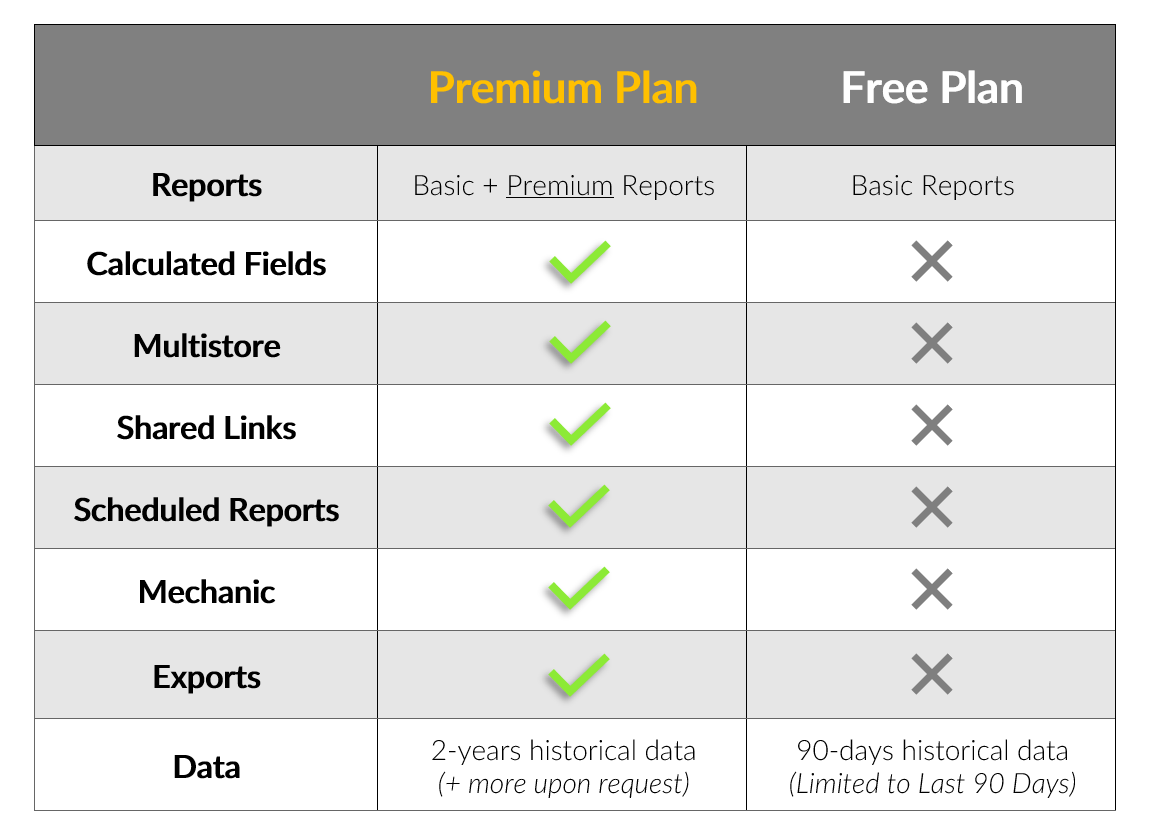
The Free Plan of Report Toaster is the standard default plan for Shopify Grow and Shopify Basic
Users.
Shopify Advanced and Plus users have all of these premium features included by default (whether
they are on Free Trial or have signed up).
Let's take a look at each of these advantages in turn (feel free to jump to a particular section if there's something in particular you're looking for).
Advanced Metrics & Premium Reports
We're always adding new functionality, further data points, and additional reports to Report Toaster.
As many of these reports rely on Calculated Fields (see above) or other further steps to create, the following reports are all included on our paid plan:
-
Return Rate Reports (by Product, by Variant, by Vendor)
-
Tax Reports (Taxes by Jurisdiction, Taxable Sales, Non-Taxable Sales Tax Lines)
-
Sell Through Rate** (By Product, By Variant, By Vendor)
-
Dead Stock (Products & Variants)
And so many more! Check out our complete premium reports section here.
**These reports are available upon request - contact us at [email protected] after signing up and we'll add them to your account.
We're adding to this list all the time, so we'll update this article as new metrics and reports become available.
Calculated Fields
Much like formulas in Microsoft Excel, Calculated Fields allow us to create custom fields for your reports and even filter on them accordingly.
(click image to enlarge)
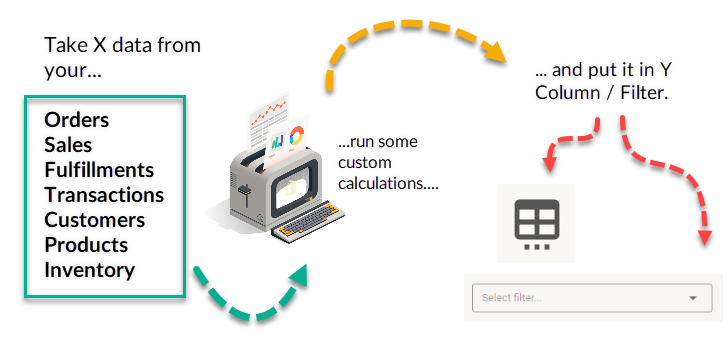
The array of possibilities here are pretty staggering, but these include things like:
-
Including data from the Line Item Properties or Note Attributes into their own columns.
-
Adding Metafield data to Report Toaster
-
County Data on Tax Reports (for those who need to report tax filing by county)
-
Creating custom metrics, such as providing a Sum or Average between one or more fields
-
Creating custom percentage fields, such as for commissions or expressing any figure as a percentage
-
Translating Staff or Location IDs into actual names
-
Breaking out Taxes fields into individual totals for each rate
-
Displaying custom shipping charges/shipping costs from a fixed rate onto a report
And so much more. The possibilities are nearly endless, so check out our main guide here for more information.
Calculated Fields are created by our Report Toaster staff. After signing up, please contact [email protected] with the details and we will take care of the rest.
Inventory History
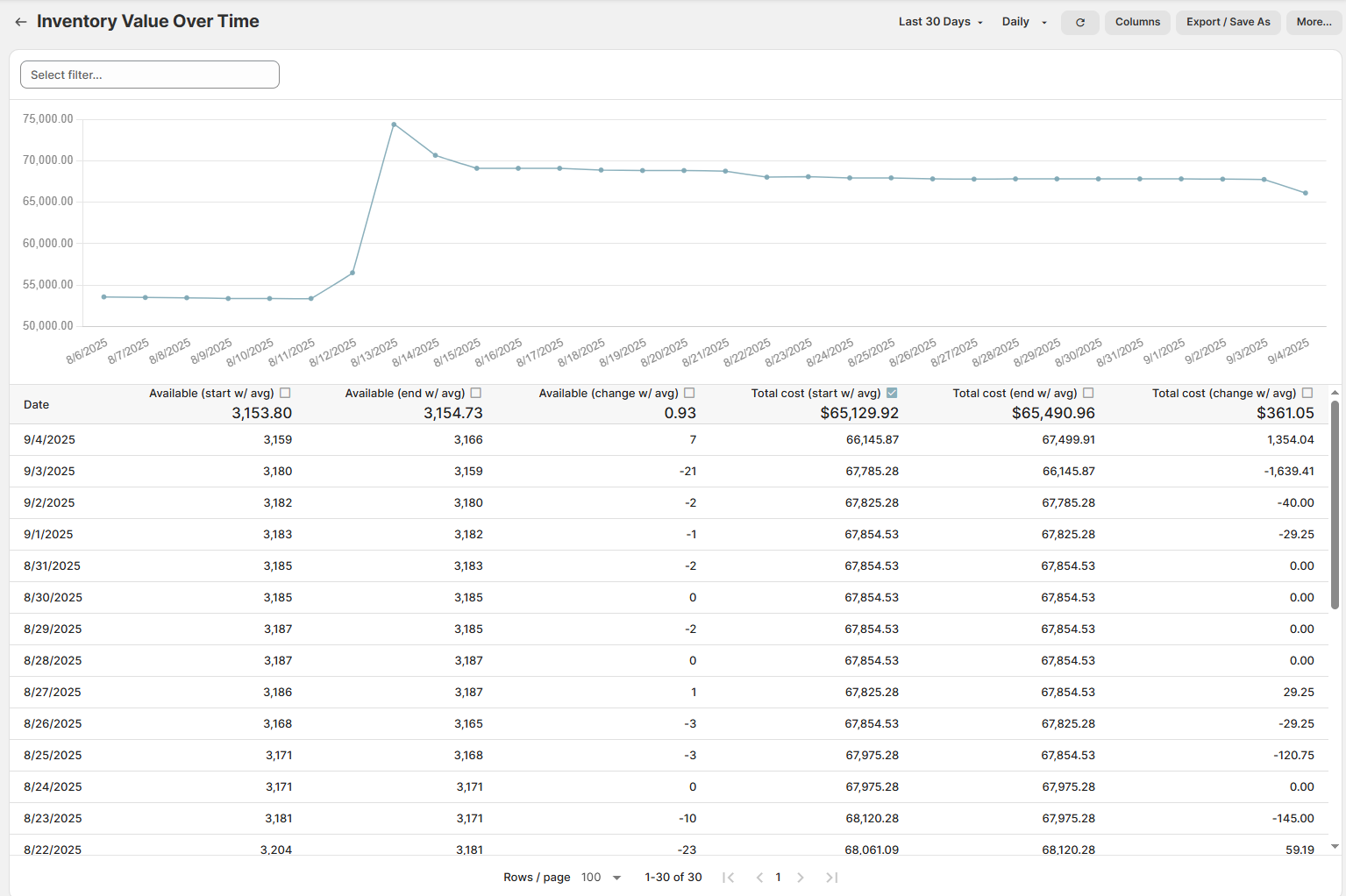
Shopify's Inventory History has limited functionality and isn't available for use in 3rd party apps.
In contrast, Report Toaster can track Inventory History indefinitely on an ongoing basis.
We can track not just the stock levels but even the cost, price, and turnover over time (as well as many custom fields built around these figures).
(click image to enlarge)
See our main guides here for more information:
Please note - Inventory History is only tracked from the time this feature is enabled for your account.
For example, if we enabled the feature for you on 6/20/23, you would have Inventory history from this date onwards.
Inventory History needs to be setup by our Report Toaster staff. After signing up, please contact [email protected] and we will take care of the rest.
Multi-store functionality
With our paid plan, you can install Report Toaster on multiple storefronts, share the information on a single account, and even compare data side-by-side on the same reports
(click image to enlarge)
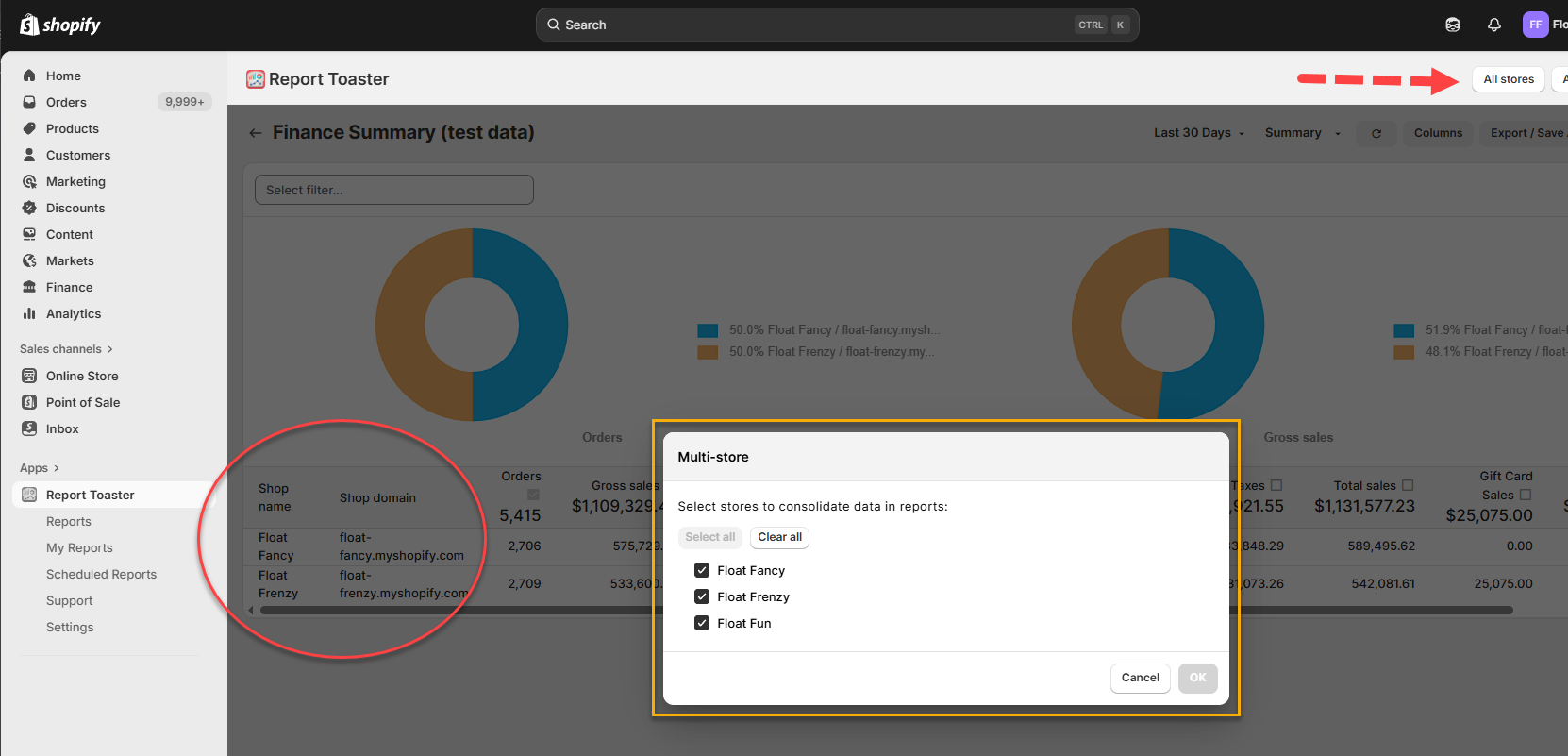
If you have more than one store on Shopify and would like to be able to view information from both your stores at once, check out our main guide here.
Shared Links
Much like a shared link in Google Docs or Dropbox, you can use this feature to create a shareable link to a Report.
(click image to enlarge)
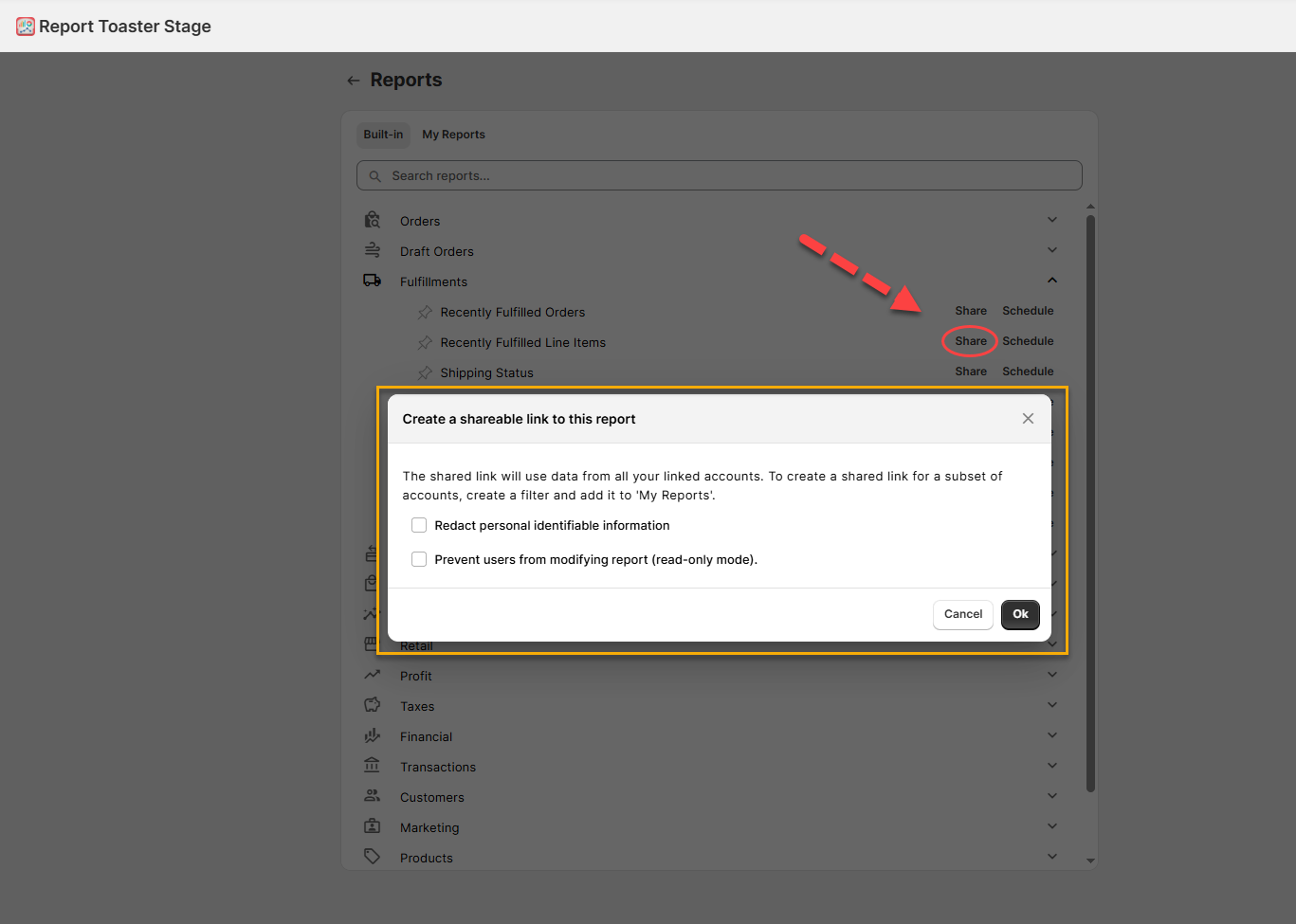
This gives you a direct, view-only link to a report which you can share with whoever you like- without the need to download the report or giving the recipient access to your account or settings.
Check out our main guide here for more information
Scheduled Reports
This feature lets you automatically schedule reports to be delivered to your chosen recipients via Email or SMS.
(click image to enlarge)
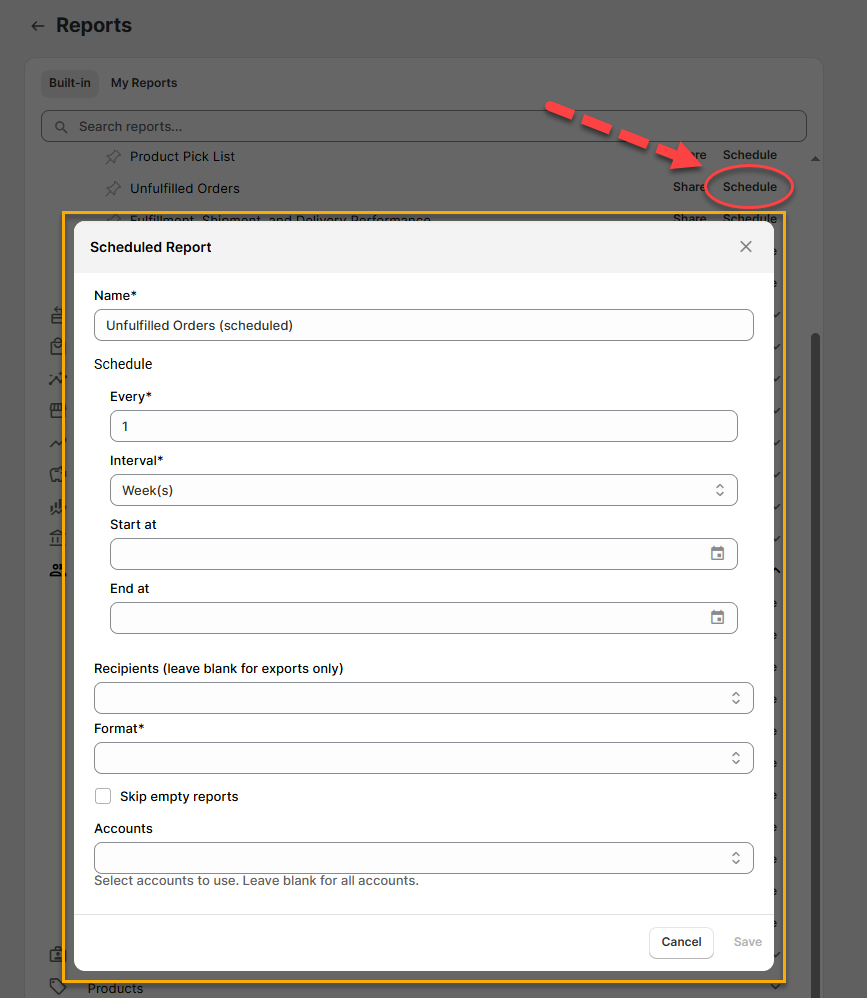
You can setup the Scheduler to run as often as you like, with as many reports as you like, with as many recipients as you like.
Check out our main guide here for more information.
Mechanic
You can read more about this integration here, but the short version is that Mechanic is a third-party app that essentially lets you integrate data between different apps/Shopify and even automate tasks based off your store's data.
See our main guide here for more information.
Exports
With the paid plan of our app, you can not only view reports in Report Toaster, but you can also save them to PDF/CSV/JSON for use elsewhere.
(click image to enlarge)
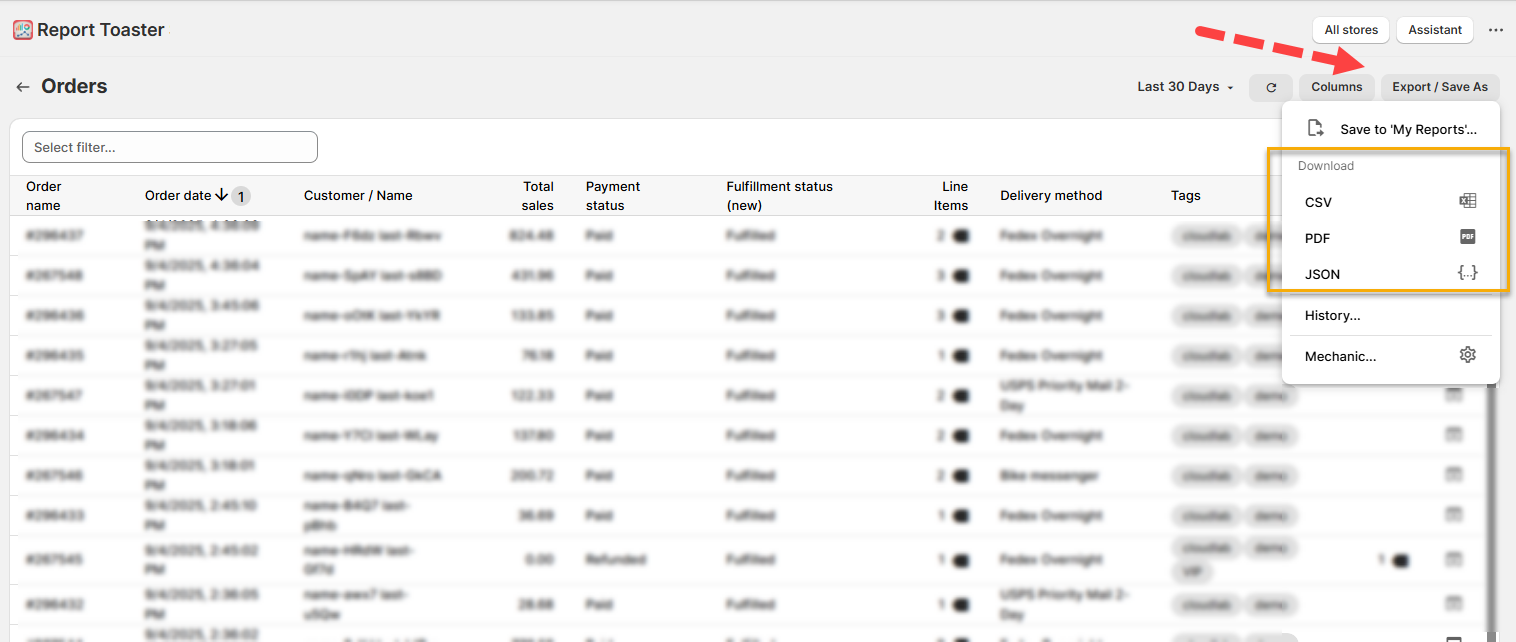
See our main guide here for more information.
Extra Data
By default, the free plan of Report Toaster comes with 90 days of historical data for your account.
This means that when you login to your account, you will have data going back to 90 days prior to Today's date.
In contrast, our paid plan comes with 2 years of historical data (and can store unlimited data, moving forward).
We can load additional historical data upon request, so contact us to tell us how far back you'd like us to go and we can make it happen.
It will take some time to sync the added data, so you may have to wait 15 minutes (or even a few hours for larger stores). See here for more info.
Conclusion
Need help understanding a Report Toaster feature?
Want to choose the right plan for your
business?
Looking for some help to get something specific setup for your store?
Then don't
hesitate to ask. You can reach out to us at any time by emailing us at [email protected]