
Premium Report - Aged Receivables
Aged Receivables
This report is used to identify customers with outstanding balances.
This is determined by comparing the Order Date and the Paid at date and including any orders where either
The order is unpaid.
The order is only partially paid and a balance still remains.
The order has been paid, but only after the last date on the report (default - 365 days ago to Today)
As a Premium Report, this is available on all Paid Plans of Report Toaster. If you aren't signed up, follow these steps to upgrade your account.
This report is designed to quickly find customers who have unpaid/partially paid orders, and group them into 'aging buckets' of how many days it's been since their order(s), and display the total sales for those orders:
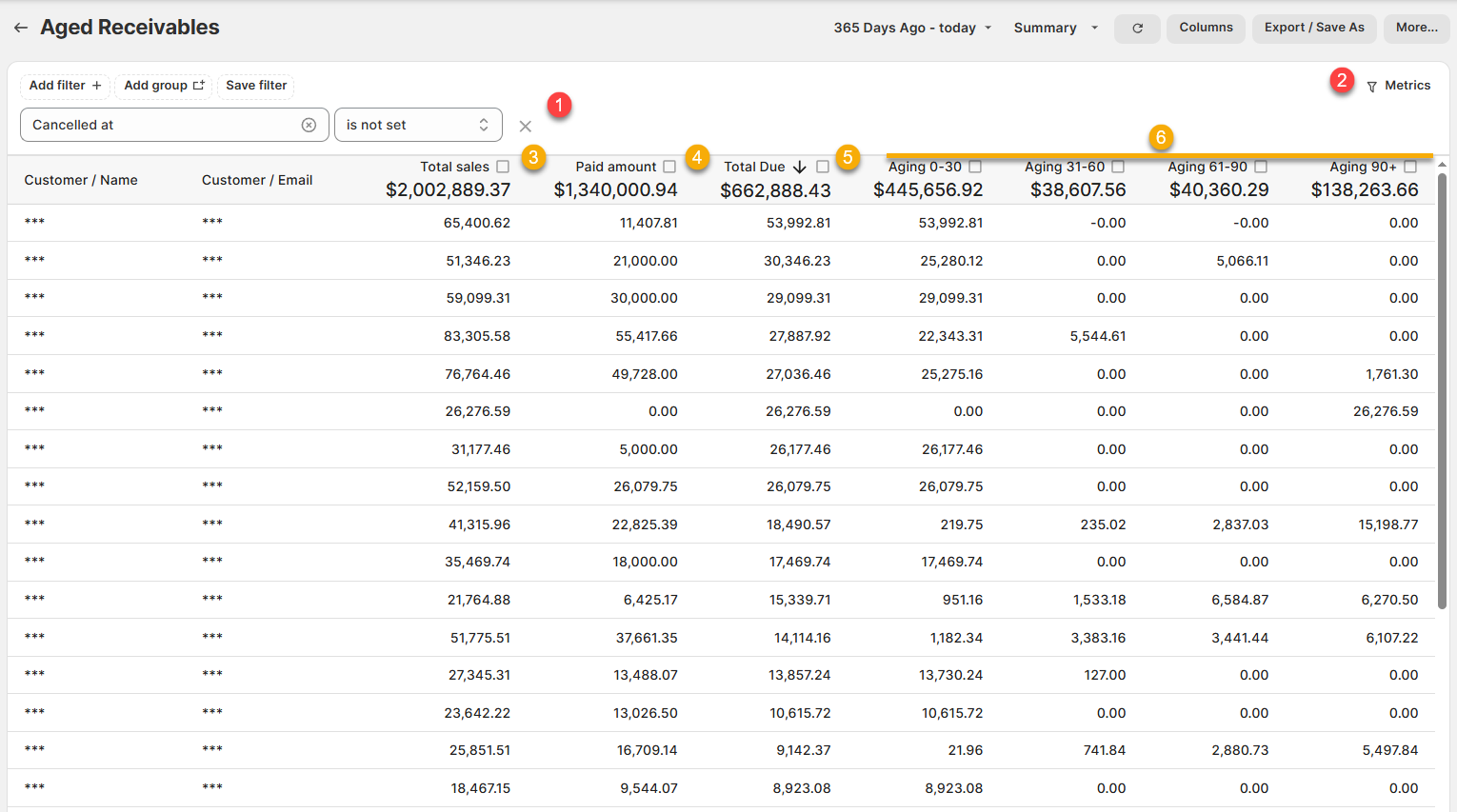
(click image to enlarge)
By default the report is set from 365 days ago to Today. However, you can adjust this date range to whatever you like.
For example, if you set the report to Last Year, then it will display any customers with outstanding balances as of December 31st.
Here are a few terms to be familiar with in order to understand Aged Receivables, numbered in the screenshots above:
1.) Cancelled at, is not set (FILTER):
This filter ensures that orders that have been cancelled are excluded from the report.
For example, if a customer had a Total Due but their order was cancelled, then they would not be included in the report.
2.) Total Due, greater than 0 (FILTER):
This metrics filter ensures that only customers with a Total Due (see below) greater than 0 are included in the report.
For example, if our first customer there has a Total Due of $53,992.81, then they would be included.
3.) Total Sales:
The sum total value of all the orders for that customer.
For example, our first customer has an order valued at $65,400.02.
4.) Paid Amount:
The amount that has already been paid by that customer.
For example, our first customer has so far paid $11,407.81 on that order.
5.) Total Due:
The amount still owed by that customer.
Remember - This is 'Total Due' as of the last date on the date range selected for the report (default - 365 days ago to Today).
For example, if our first customer had an order for $65,400.02 and they've already paid $11,407.81, then that means they still owe $53,992.81.
6.) Aging Buckets:
Orders are 'bucketed' according to the number of days that have passed since the Order Date on an unpaid order and the last date on the report (default - Today).
If an order falls within this range, the total still due for that order is displayed in the field.
For example, if our first customer had an order placed 25 days ago, it would display the total due in the Aging 0-30+ column.
Note - We can create further aging buckets for users upon request - just reach out to us at [email protected] and we can get those setup for you accordingly.
Like all Report Toaster reports, these reports are fully customizable - so you can adjust the date range, add/remove columns, introduce a filter or change the sort to suit your individual needs. See our basic guides here for more info.
If you want to see our other premium reports, check out our main section here.