
Premium Report - Winback Customers
Winback Customers
This report shows you a list of Customers who have not made a purchase for some time (default - last 60 days).
This is often useful for merchants who are looking to target them for future campaigns so they'll return and make a purchase at the store.
Using this report, you can get a list of customers who have made purchases, see how long it's been since they last bought something from the store, and view the total value of that customer to gauge their potential value.
As a Premium Report, this is available on all Paid Plans of Report Toaster. If you aren't signed up, follow these steps here to upgrade your account.
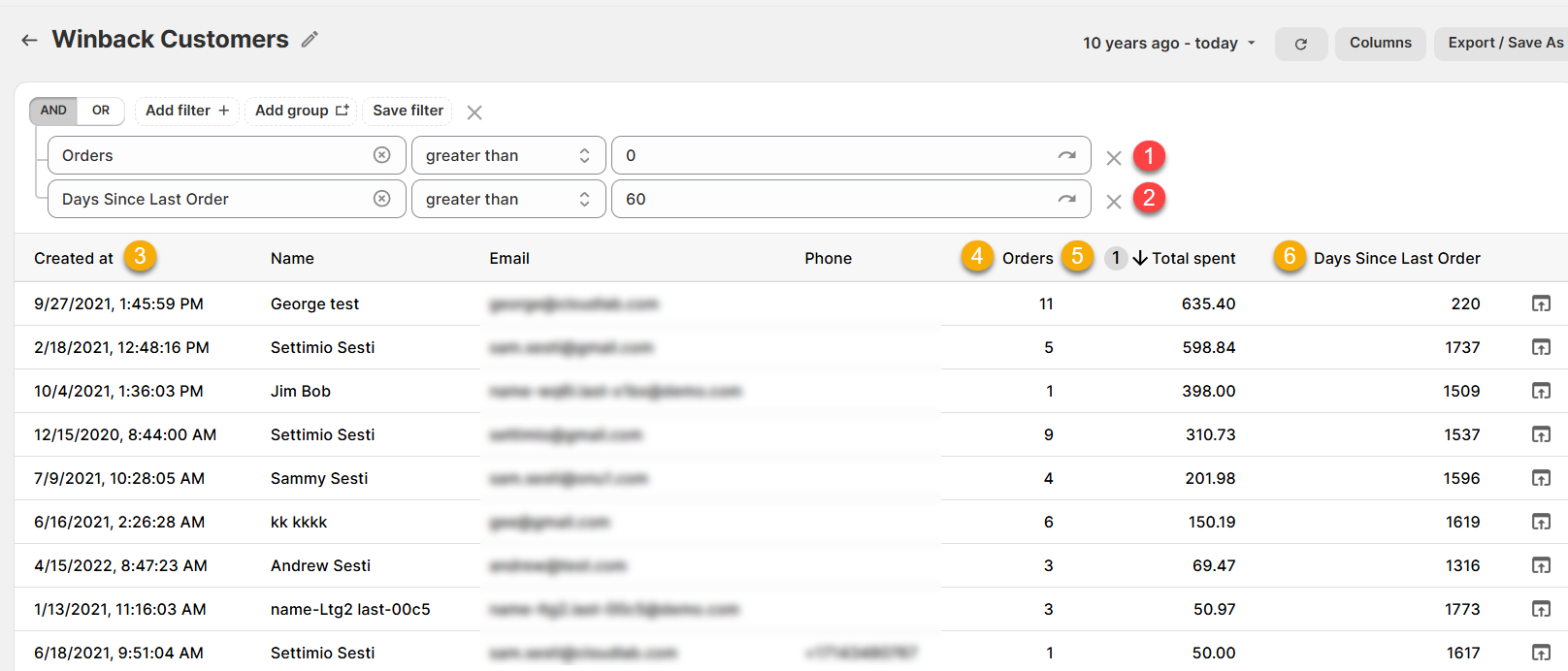
(click image to enlarge)
Here is what you need to be familiar with to understand the Winback Customers report:
1.) Orders, greater than, 0 (FILTER): This filter ensures that only customers who have placed an order are included in the report.
For example, if a customer has placed 11 orders at the store, then they would be included in the report.
2.) Days Since Last Order, greater than, 60 (FILTER): This filter ensures that only customers who last placed an order 60 or more days ago are included in the report.
You can of course adjust this to whatever threshold most makes sense for your particular business.
For example, if a customer last placed an order 220 days ago, then they would be included in the report.
3.) Created at: The date the customer was first created at the store.
This is what is used for the date range (top right), so by default the report shows any customers created in the Last 10 years.
For example, that first customer was created on 9/27/2021 at 1:45pm.
4.) Orders: The number of Orders placed by that Customer since they were first created.
For example, we can see that first customer placed 11 orders at the store.
5.) Total Spent: The total amount spent by that customer since they were first created.
The report is sorted by this column by default so that the most valuable customers appear first.
For example, that first customer has spent a total of $635.40 across those 11 orders.
6.) Days Since Last Order: The number of days between when the Customer last placed an order and Today.
For example, we can see that the first customer last placed an order 220 days ago.
Like all Report Toaster reports, this report is fully customizable - so you can adjust the date range, add/remove columns, introduce a filter or change the sort to suit your individual needs. See our basic guides here for more info.
For other premium reports you can add to your account, check out our other article guides here.