
What's New? - August 2022
Rounding out the end of summer with another monthly update, today we're here to talk about our latest feature — adding metafield data to Report Toaster!
For merchants who use metafield data in their storefront, this is a great addition to be able to include as a column or field in our reports.
Better yet, you can even combine the metafields with filters and calculated fields to generate some very specific custom reports for your store.
Let's dive in!
What are Metafields?
For those of you who have been using Metafields in Shopify for some time now, feel free to skip to the next section.
Otherwise, here's a quick primer :)
The short version is that metafields are a way to store additional specialized information (for example on products, variants, customers, orders etc.) that isn't typically captured by the Shopify admin.
Merchants can use metafields:
1.) On the front-end storefront, to provide extra details to customers (for example if you sell cookies and want to display the ingredients)
2.) On the back-end in the Shopify admin, for internal tracking purposes (for example tracking product dimensions or part numbers for shipping purposes)
For more information on Metafields, check out Shopify's guide here and their developer resource here.
This information can be almost anything, so metafields are very powerful and can be customized to suit the needs of any particular business.
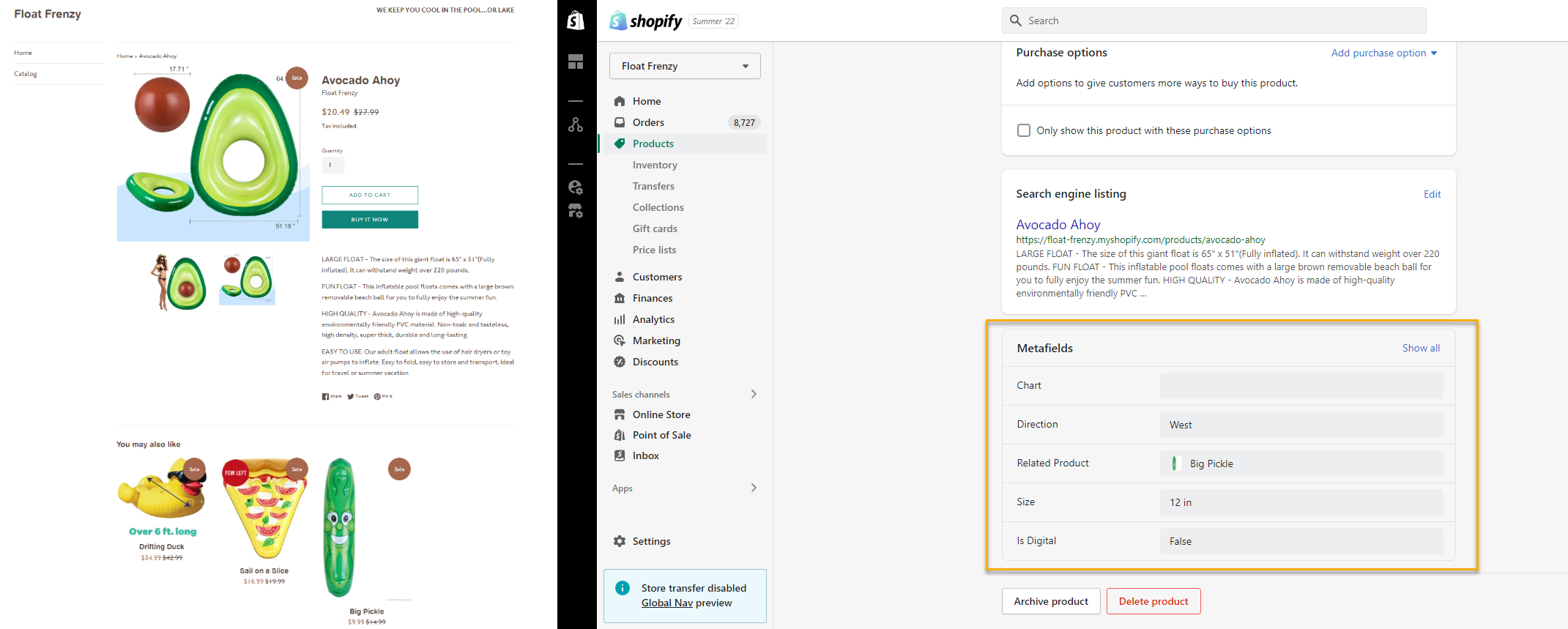
Here's an example of product metafields from our demo store:
(click image to enlarge)
Here you can see we have several metafields stored for this product on the back-end that make it easier for our inventory and fulfillment staff to manage the product.
In this case, these attributes include things like the specific dimensions (for packing), the direction (which coast it's shipped from) and whether it is classified as a digital good or not.
Think of metafields as “extra information about X” (whether a product, customer, order, etc.) and you won't be far wrong.
Report Toaster and Metafields
So where does Report Toaster come into this?
Just like any other field in Shopify, Report Toaster can now capture this stored metafield data and include it in a report via our Calculated Fields.
Note: Metafield data and Calculated Fields are only available on paid plans of Report Toaster. You can sign up anytime by visiting https://reporttoaster.cloudlab.com/subscribe.
Let's take a look at this in practice.
Here we can see a report we created for a customer that includes metafield data in the highlighted column:

(click image to enlarge)
Basically, they had their storefront setup to track the codes associated with each product, as well as for their shipping, refunds, and credits/payments.
By pulling this metafield data together into a report, this helps their internal teams record sales revenue and upload the results to their third-party accounting system.
As well as tracking metafield data on overall sales reports, this can also be utilized on an order-by-order basis.
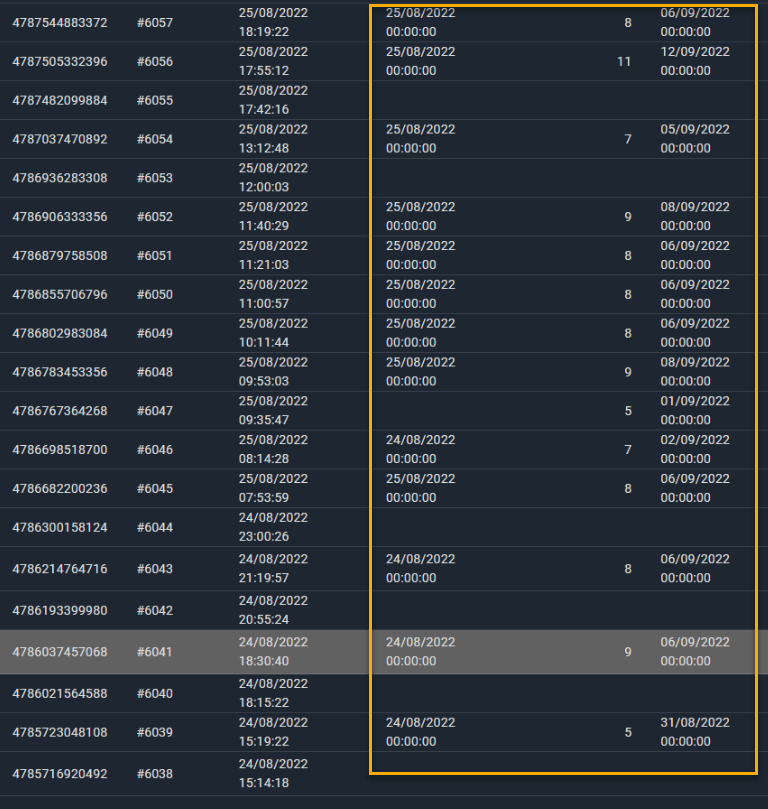
For instance, one of our other customers had information stored on every order that could track the Payment Date, Estimated Number of Days to Deliver, and the Date of Delivery:
(click image to enlarge)
This information is crucial to manage their inventory and fulfillment. With this report, they can easily see the pertinent delivery information and prioritize fulfillment accordingly.
Of course, simply adding raw metafield data to a report is really just the foundation. Let's look at how you can use this to further customize a report.
Combining Metafields with Filters / Calculated Fields
Like any other field in Report Toaster, once you've included metafields on a report you can utilize both filters and calculated fields to further segment your data.
Using the examples above, we could easily imagine situations where it's important to narrow down a report based on certain metafields.
For example, show me orders where the estimated days of delivery is less than three. These might be using a premium shipping option and therefore need to be prioritized at the warehouse.
The use cases here are limited only by your imagination. Here are a few other possibilities:
- Listing ingredients in certain products and preparing a pick list for a food provider so they know how many of each ingredient to prepare.
- Storing premium subscription tier information for customers to segment them differently for marketing purposes.
- Associating similar products so customers can be recommended related items.
- Filtering fabrics by size, material, thread count, allergens, and more.
You get the idea.
Setting This Up
Including metafield data in Report Toaster is easy. All you need to do is:
- Have metafields set up in your Shopify admin.
- Have a paid copy of Report Toaster.
- Contact us via [email protected] to let us know which metafields you want included on which reports.
- We'll take care of it :)
Nice and simple. In fact, we've already implemented metafield data in a number of our merchants' reports already! So if you need help setting this up for your storefront, feel free to let us know.
Until next time!